Moon tracking app · in development
Luno
/ˈluːnəʊ/ · LOO-noh
A moon tracker for planning night photography. Pick a place, then drag through time to see where the moon will be, how much of it will be lit, and what the sky will look like around it.
Coming soon to Google Play Coming soon to the App Store
Luno is still being worked on and isn't available to download yet.
Overview
Luno was born out of a conversation with a graphic illustrator, who had created the design for the app and asked whether I could make it a real one. It was originally a concept for a tool to help plan night photography: to know ahead of time where the moon will rise, how high it will climb, and what phase it will be in.
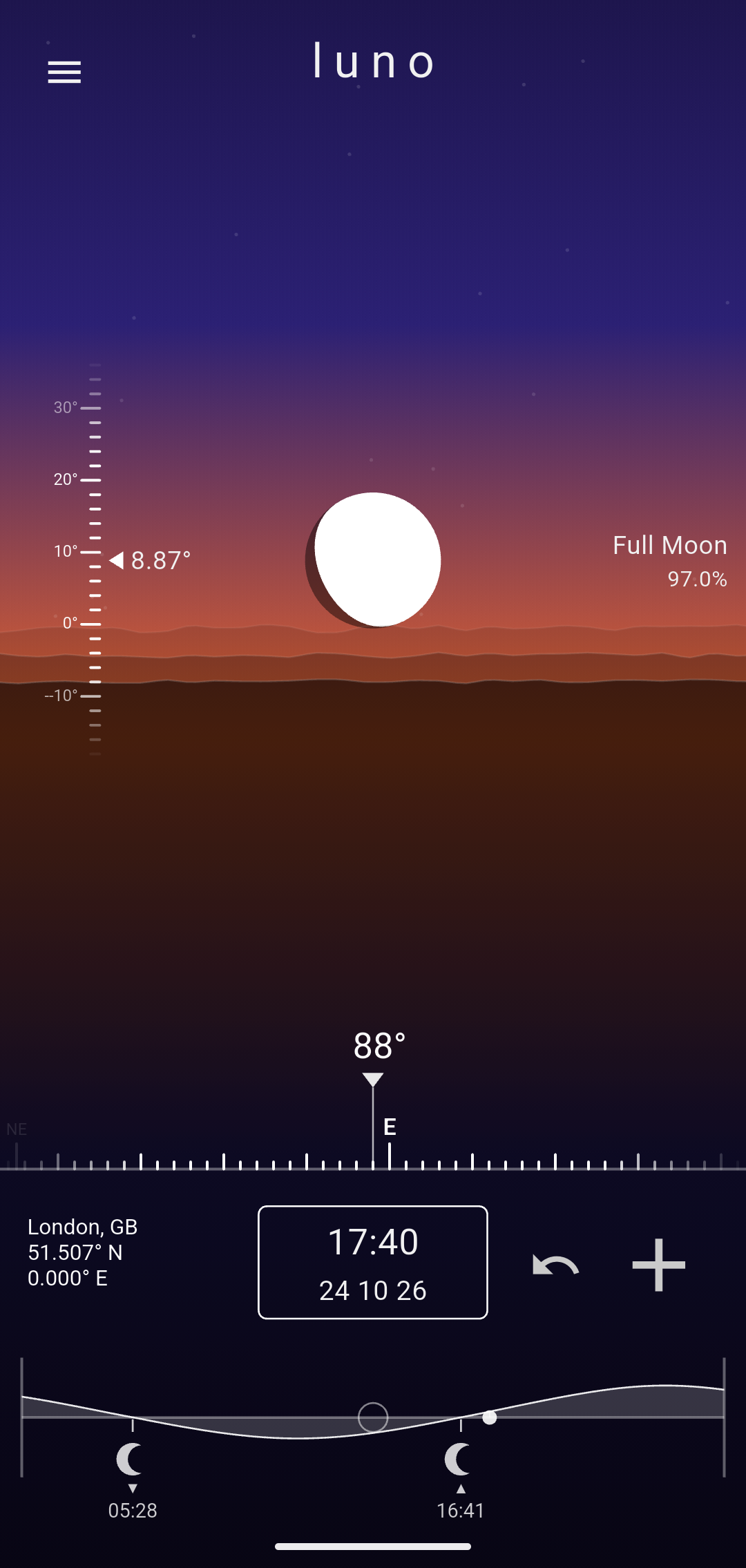
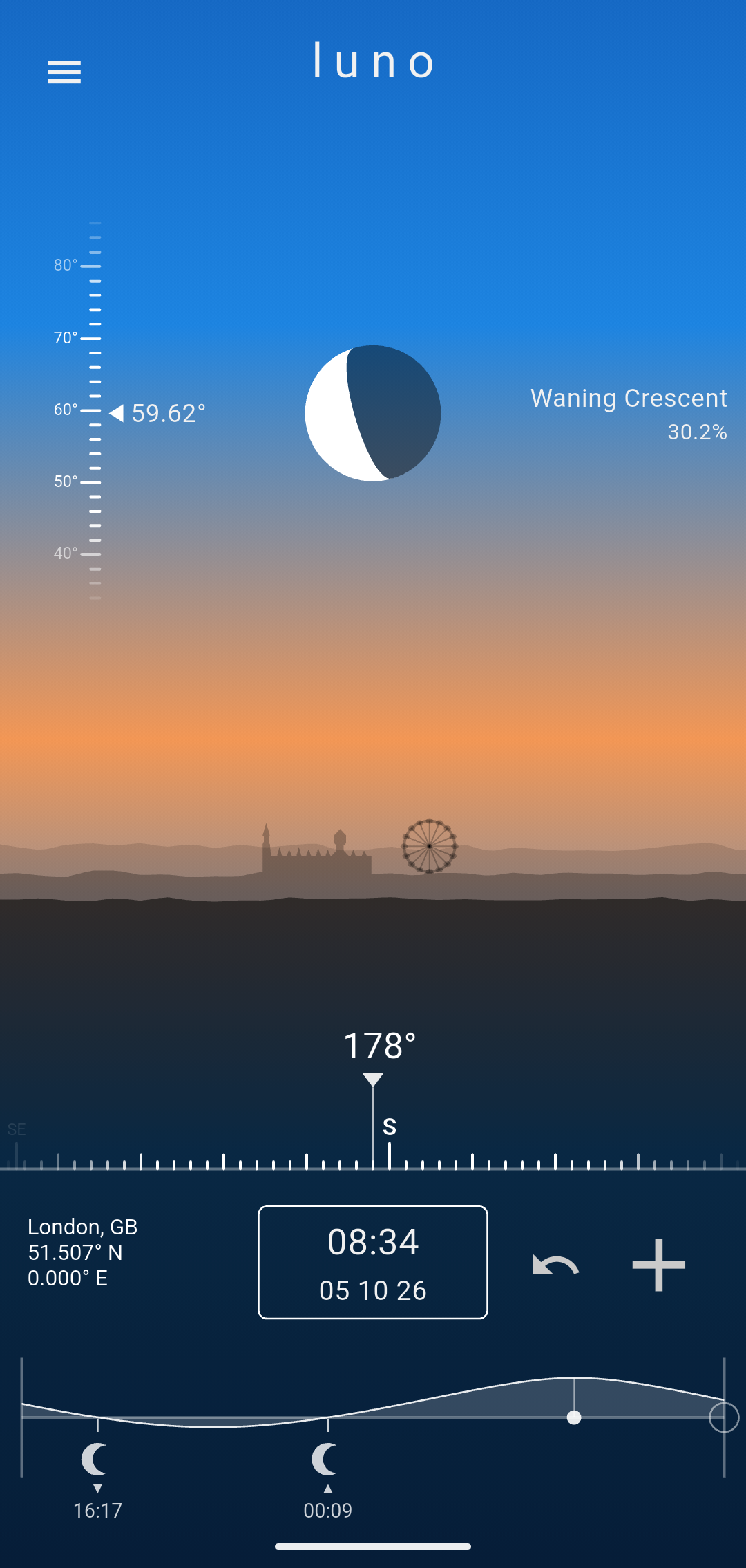
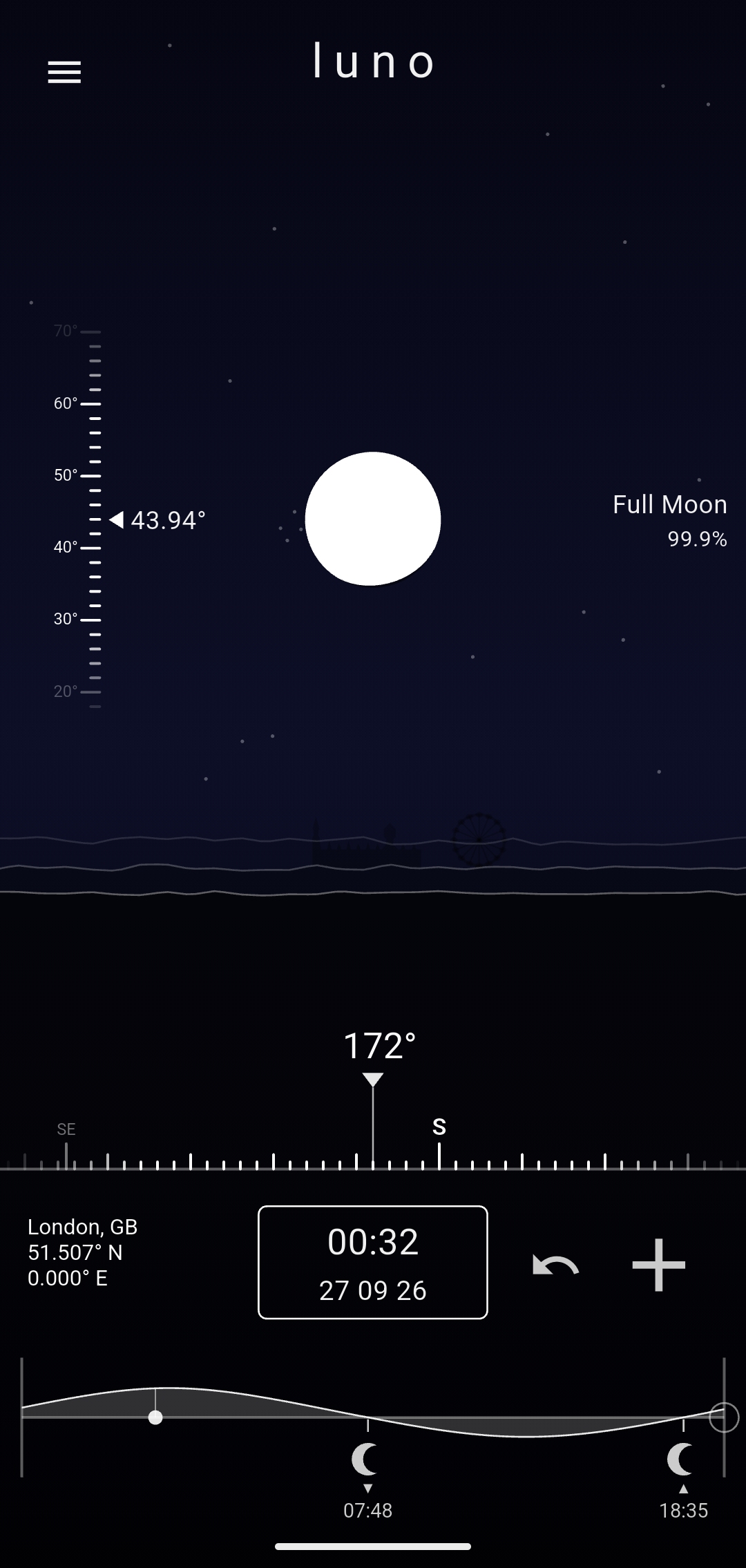
The app shows a live scene of the sky in the moon's direction for a chosen place, and a timeline that can be dragged to any moment in the coming days.
What's on screen
- The moon Shown where it is in the sky, in its current phase, with its lit side towards the sun.
- The sky Changes colour with the sun, from daylight through sunset and twilight to night.
- The landscape Hills that turn to follow the moon as it moves round the sky.
- The timeline How high the moon will be over the next two days, and when it rises and sets. Drag it to change the time.
- Framework
- Flutter & Dart
- Storage
- SQLite for cached results
- Platforms
- Android and iOS
- Astronomy
- Jean Meeus' Astronomical Algorithms and the suncalc library
- Locations
- 19 cities, from Honolulu to Auckland
- Design
- From an illustrator's original concept
- Status
- In development, not yet released
The scene
The main screen shows the sky in the moon's direction, as if you'd turned to face it. As the moon moves round the sky, the stars and hills pass by behind it.
The sky
The sky's colours follow the sun rather than the clock: daytime blue gives way to an orange glow at the horizon, then twilight purples, then night, and the stars come out as it darkens.
Because it follows the sun, the sky changes with the seasons and from place to place. On a June night in London it never gets fully dark, and in Reykjavik it barely gets dark at all.
The landscape
Layered hills wrap all the way round and turn with the moon. As the moon climbs, the horizon drops away, as if you were tilting your head back to follow it. In London, the Houses of Parliament and the London Eye stand on the skyline to the south.
The moon
The moon is drawn in its current phase and turned so its lit side faces the sun, as it does in the sky. Beside it are the phase name and how much of it is lit. How this is worked out is explained further down.
Scrubbing through time
The graph at the bottom of the screen shows how high the moon will be over two days, and when it rises and sets. Drag along it and the whole scene moves with you.
- Drag the ring
- Move through time
- Drag the graph
- Pan across a seven-day window
- Tap the graph
- Glide to the time you tapped
- Reset
- Glide back to now
- Tap the clock
- Jump to any date and time
Keeping it smooth
Scrubbing has to keep up with your finger, which is too fast to run the orbital maths on every frame. Instead, Luno works out the days around the chosen time in advance, with a quick rough pass so the graph appears straight away and then a finer one. As you drag, it reads the scene from those results. They're saved on the phone, so going back to a place and time you've already looked at is instant.
Planning ahead
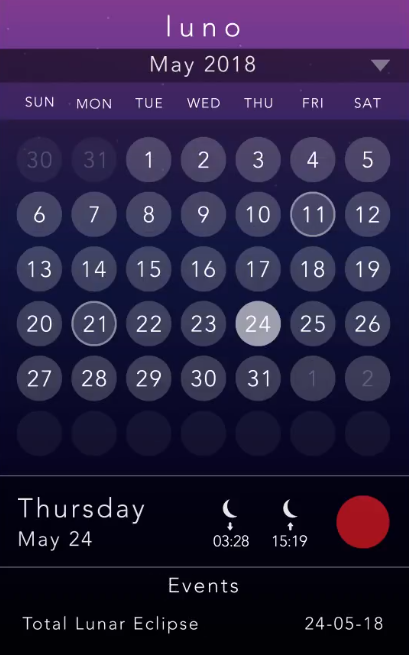
A calendar sheet shows a month at a time. Picking a day gives that day's moonrise and moonset at the current location, and an event, with a title and a place, can be added to it to plan a shoot.
Where the moon is
Luno works out the moon's position and phase from just the date and time and the observer's latitude and longitude. The calculator is a self-contained Dart version of the formulas used by the suncalc library, which come from Jean Meeus' Astronomical Algorithms and the simplified orbital models at aa.quae.nl.
1. Time
Every formula is a function of d, the number of days since the J2000.0 epoch, noon on 1 January 2000. It comes from the Julian date, a continuous count of days used in astronomy.
JD = t / 86 400 000 + 2 440 587.5        t = milliseconds since 1 January 1970, UTC
d  = JD − 2 451 545
2. The moon's place among the stars
The moon's orbit is described by three angles that grow steadily with time: its mean longitude L; its mean anomaly M, how far it has travelled round its elliptical orbit since perigee; and F, its distance from the point where its orbit crosses the plane of the Earth's. The largest correction for the ellipse gives the moon's ecliptic longitude λ, the 5° tilt of its orbit gives its ecliptic latitude β, and the anomaly also gives its distance Δ.
L = 218.316° + 13.176396° × d
M = 134.963° + 13.064993° × d
F =  93.272° + 13.229350° × d

λ = L + 6.289° × sin M
β = 5.128° × sin F
Δ = 385 001 − 20 905 × cos M km
3. From the ecliptic to the equator
Ecliptic coordinates are measured against the plane of the Earth's orbit. Tilting them by the angle of the Earth's axis, ε = 23.4397°, gives the right ascension α and declination δ, which are measured against the celestial equator, like longitude and latitude projected onto the sky.
α = atan2(sin λ cos ε − tan β sin ε, cos λ)
δ = asin(sin β cos ε + cos β sin ε sin λ)
4. Bringing in the observer
Right ascension and declination are the same for everyone on Earth. The observer comes in through local sidereal time θ, the right ascension crossing their meridian at that moment, which depends on the time and their longitude. Subtracting the moon's right ascension gives the hour angle H: how far the moon has moved past the observer's meridian.
θ = 280.16° + 360.9856235° × d + longitude     longitude east positive
H = θ − α
5. Altitude and azimuth
With the observer's latitude φ, the hour angle and declination give the moon's altitude h above the horizon and its azimuth A.
h = asin(sin φ sin δ + cos φ cos δ cos H)
A = atan2(sin H, cos H sin φ − tan δ cos φ)
A is measured from due south, so the app adds 180° to turn it into a compass bearing. Near the horizon the atmosphere bends moonlight, so the moon looks higher than it is. Sæmundsson's refraction formula (Meeus, formula 16.4) is added to the altitude, which lifts the moon by about half a degree at the horizon and much less above it:
R = 0.0002967 / tan(h + 0.00312536 / (h + 0.08901179)) radiansLast, the parallactic angle q (Meeus, formula 14.1) is the angle, at the moon, between the direction of the celestial pole and the observer's zenith. It's needed in step 7 to turn the disc the right way up.
q = atan2(sin H, tan φ cos δ − sin δ cos H)6. Phase and illumination
Phase depends only on where the sun and moon are relative to each other, so it's the same for everyone on Earth at a given moment. The sun's position comes from the same kind of model, its mean anomaly plus the correction for the Earth's elliptical orbit, and is converted to α☉ and δ☉ in the same way as the moon's, with β = 0.
M☉ = 357.5291° + 0.98560028° × d
C  = 1.9148° sin M☉ + 0.02° sin 2M☉ + 0.0003° sin 3M☉
λ☉ = M☉ + C + 102.9372° + 180°           102.9372° is the longitude of the Earth's perihelion
The elongation ψ is the angle between the sun and moon as seen from Earth. With the two distances, it gives the phase angle i, the angle between the sun and the Earth as seen from the moon. A phase angle of 0° is a full moon and 180° is a new moon, and the lit fraction k follows from it.
cos ψ = sin δ☉ sin δ + cos δ☉ cos δ cos(α☉ − α)
i     = atan2(R☉ sin ψ, Δ − R☉ cos ψ)     R☉ = 149 598 000 km
k     = (1 + cos i) / 2
The position angle χ of the bright limb, measured eastwards from north, says which side of the disc is lit, and so whether the moon is waxing (χ < 0) or waning. Together with i it gives a phase that runs from 0 at new moon, through 0.5 at full moon, and back to 1 (Meeus, chapter 48).
χ     = atan2(cos δ☉ sin(α☉ − α), sin δ☉ cos δ − cos δ☉ sin δ cos(α☉ − α))
phase = 0.5 + 0.5 × sign(χ) × i / π
The app rescales the phase to run from −1 to +1, so full moon is at 0 and new moon at both ends, where the animations wrap round. The phase names cover equal ranges.
7. Turning the disc
The bright-limb angle χ is measured from celestial north, but the observer sees the moon against their own horizon. Taking away the parallactic angle q gives the direction of the lit side relative to straight up for that observer. This is why a crescent moon tilts differently in London and lies almost on its back in Quito, near the equator. The lit part is drawn on the right of an upright disc while the moon is waxing and on the left while it is waning, giving the impression of a rotating spherical object.
8. Moonrise and moonset
The moon's rise and set times are found by searching. Starting at midnight the altitude is calculated every hour and where it crosses 0° the moon either rises or sets.
Limitations and improvements
Luno is still being built. These are the things it doesn't do yet, or only does roughly:
- It doesn't yet include eclipse dates, which are some of the events most worth planning a shoot around.
- Luno uses a simplified model of the moon's orbit, so its position can be out by a degree or two. That's good enough to see roughly where it will be, but not to line it up behind a building.
- Locations are a fixed list of 19 cities. There's no way yet to use the phone's location or to search for a place.
- The hills don't match the real horizon, and the stars aren't a real star map. Landmarks are only drawn for London.
- Events are only stored on the phone and aren't synced with a calendar.
Ideas for further work
- Eclipse dates in the calendar and on the timeline, with the times each eclipse starts, peaks and ends at the chosen location.
- Using the phone's location, and searching for any place.
- A real horizon built from elevation data, and landmarks for more cities.
- Finding when the moon will be at a given bearing and altitude, such as rising behind a particular landmark.
- Showing golden hour and twilight on the timeline, which the app already calculates, so the light on the land can be planned together with the moon.
- Syncing events with Google Calendar or iCal.